An AI news aggregator collects news from selected sources and uses AI to make the feed easier to scan, sort, and understand. The best version is not just a chatbot that searches the web. It is a repeatable curation workflow: reliable feeds come in, irrelevant items are filtered out, and AI summaries or TL;DRs help readers decide what deserves their attention.
That is why WordPress is a strong fit. If you want a private reading app, use a consumer news tool. If you want to publish a niche news site, build topic pages, grow search traffic, add newsletters, and control the source list, you need a content system you own.
This tutorial shows how to build an AI news aggregator in WordPress with WP RSS Aggregator. The workflow uses RSS feeds for collection, filtering for source control, and Aggregator’s AI Summaries and AI TL;DRs to make imported posts more useful for readers.
What is an AI news aggregator?
An AI news aggregator is a website, app, or internal dashboard that gathers news from multiple sources and uses AI to help people process it. The AI layer might summarize articles, extract key points, group similar stories, highlight trends, or personalize what a reader sees.
The important part is the source workflow. Without a controlled source list, an AI news aggregator becomes another noisy feed. With a controlled source list, it can become a useful editorial product: a page people visit because it saves them time on a specific beat.
For a WordPress site, the workflow usually looks like this:
- Choose the topic and audience.
- Add trusted RSS sources.
- Import selected feed items as posts.
- Filter sources so off-topic items do not reach the site.
- Generate AI summaries or TL;DRs for the sources where they help.
- Review, publish, and organize the imported posts into useful pages.
Should you build one or use an AI news app?
The current search results for “ai news aggregator” are full of consumer apps, prototype builders, open-source projects, and discussions from people trying to replace expensive monitoring tools. That is a clue: people are not all looking for the same thing.
Use the table below to choose the right path before you start building.
| Goal | Best path | Why |
|---|---|---|
| Read AI-curated news for yourself | Use a consumer AI news app | You do not need a website, source pages, archives, or publishing controls. |
| Prototype a news app interface | Use an app builder or design tool | You are testing UX, not operating a live editorial site. |
| Publish a niche AI-assisted news site | Build with WordPress and RSS | You control sources, categories, archives, SEO pages, newsletters, and editorial review. |
| Create a custom data product or API | Build custom software | You need custom crawling, deduplication, clustering, or enterprise integrations. |
This article focuses on the third path: a public or private WordPress site that imports news, curates it, and uses AI to make each item easier to evaluate.
What you need before you start
Do not start by adding dozens of feeds. Start with the shape of the site.
- A narrow topic: “AI news” is too broad. “AI policy updates for startup founders” is workable.
- A WordPress site: This can be a new site or a section of an existing publication.
- WP RSS Aggregator: Use it to add sources, import feed items, filter content, and display or publish the results.
- A plan with Feed to Post: AI summaries and TL;DRs work on imported posts, so the sources you want to process with AI need to use a post-import workflow.
- AI access: AI Summaries and AI TL;DRs are available on Pro and Elite plans and use AI Credits.
- An editorial rule: Decide what gets published automatically, what requires review, and what should only be monitored.
For the first build, keep the system small. Ten good sources are better than one hundred sources that need constant cleanup.
Step 1: Define the job of the aggregator
An AI news aggregator should have a job beyond “show recent news.” A clear job helps you decide which sources to include, which posts to reject, and where AI helps.
Choose one of these starting models:
- Monitoring hub: Track updates across a niche for a team or community.
- Public news site: Publish curated items around one topic and build search visibility.
- Research feed: Help readers scan long reports, papers, announcements, or policy updates.
- Newsletter input system: Collect items throughout the week, then turn the best ones into a digest.
Then write a one-sentence rule for the site. For example: “This site tracks regulatory, legal, and platform-policy updates that affect companies building AI products.” That sentence becomes your filter when a source looks tempting but does not belong.
Step 2: Build a source list
The quality of the source list determines the quality of the aggregator. AI can summarize a weak source, but it cannot make a poor source strategy feel trustworthy.
Start with sources that publish original updates or consistently useful analysis. For an AI policy aggregator, that might include government agencies, standards bodies, research labs, major legal blogs, and a small number of trusted technology publications. For a local business aggregator, it might include city notices, chamber of commerce updates, local news outlets, job feeds, and real estate reports.
| Source type | Use it for | Watch out for |
|---|---|---|
| Official blogs and newsroom feeds | Primary announcements | Marketing language and limited context |
| Industry publications | Context and analysis | Duplicate coverage of the same story |
| Google News RSS feeds | Discovery around a topic | Broad matches and noisy long-tail results |
| YouTube RSS feeds | Video explainers, interviews, product updates | Weak text content unless titles/descriptions are useful |
| Company or product changelogs | Release monitoring | Small updates that may not deserve a full post |
If you need source ideas, start with the publishers your audience already trusts. Then look for RSS feeds on those sites. If a site does not advertise its feed, try the methods in our guide to finding an RSS feed URL.
Step 3: Add your sources in WordPress
In your WordPress dashboard, go to Aggregator -> Sources and add a new source. Paste the RSS feed URL, give the source a clear name, and save it.
Use names that will still make sense six months later. “OpenAI Blog” is better than “AI feed 1.” “EU AI Act updates” is better than “policy.” Clean source names make it easier to review imports, fix problems, and explain the site to another editor.
For each source, decide whether it belongs in one of three groups:
- Publish-ready sources: High-trust feeds that can import as posts with minimal review.
- Review-first sources: Useful feeds that should import as drafts or pending review.
- Discovery sources: Broad feeds used to find items, with stronger filtering before anything is published.
This grouping matters when you add AI. A publish-ready source might get AI TL;DRs on every item. A discovery source should usually be filtered first, reviewed second, and processed with AI only when the result is worth showing.
Step 4: Import selected sources as posts
Aggregator can display feed items, but an AI news aggregator usually needs imported posts. Posts give you WordPress categories, tags, authors, permalinks, archives, SEO fields, editorial review, and a place for AI output to appear.
For the sources you want to process with AI, configure the source to import feed items as posts. During the first setup pass, use conservative publishing settings:
- Import new items as
DraftorPending Review. - Assign a category that matches the source’s topic.
- Keep source attribution visible.
- Use a fallback image only if the source often lacks featured images.
- Review the first import before increasing automation.
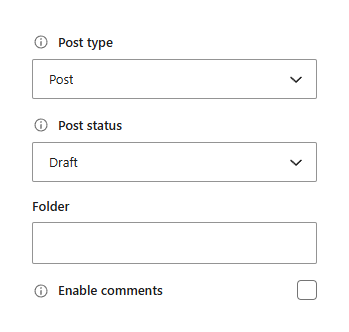
Do not judge the setup from one article. Let each source import a small batch, then check titles, excerpts, categories, media, attribution, and whether the feed is bringing in the content you expected.
Step 5: Filter the feed before you use AI
Filtering comes before AI. Otherwise, you spend credits making off-topic items look polished.
Use keyword and phrase filters to include the topics that belong and exclude patterns that repeatedly create noise. If you are building an AI policy aggregator, your include rules might mention regulation, copyright, model safety, data privacy, transparency, and enforcement. Your exclude rules might remove unrelated product launches, stock-market filler, or broad “AI tools” listicles.
Filtering should be different for each source. A government feed might need almost no filtering. A broad Google News feed probably needs strict filters. A company blog may need exclusions for hiring posts, events, or investor updates.
After the first week, review rejected and imported items together. If good articles are being rejected, your filters are too strict. If irrelevant posts still reach review, your filters are too broad.
Step 6: Enable AI Summaries and AI TL;DRs
Once the source is importing the right posts, add the AI layer.
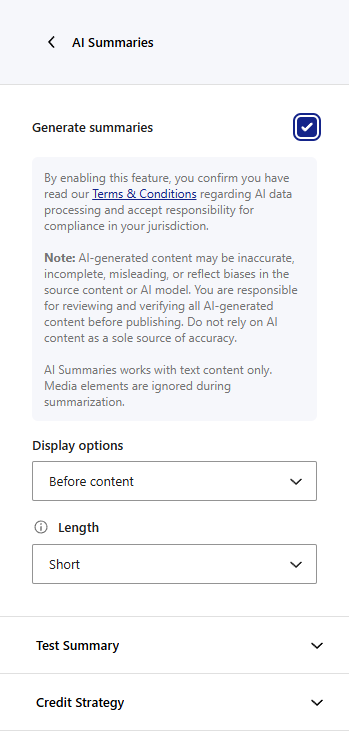
For AI Summaries, edit the source and go to Advanced -> AI -> AI Summaries. Enable summary generation, choose whether the summary appears before or after the imported content, choose a short or long summary length, and use the preview option to test the output before applying it to regular imports.
For AI TL;DRs, use Advanced -> AI -> AI TL;DRs. TL;DRs are better when readers need key points quickly. Summaries are better when readers need a short explanation in paragraph form.
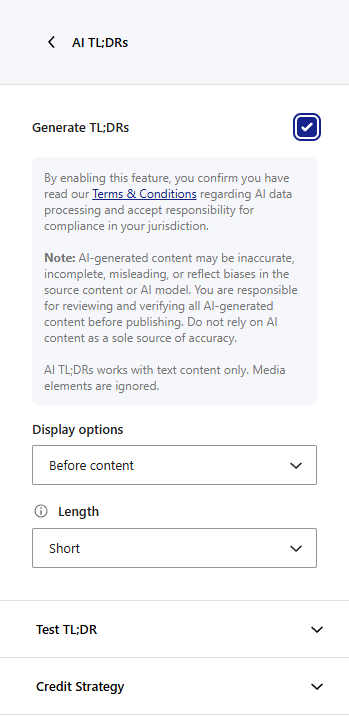
Use both only when they serve different jobs. On a fast-moving feed, a TL;DR near the top may be enough. On a research-heavy source, a longer summary may be more helpful. On a newsletter source library, summaries can help an editor decide what to include later.
Aggregator uses AI Credits for these features. A successful summary uses credits, and a successful TL;DR uses credits. Test previews also use credits, so preview with a small number of representative sources rather than every source in the system.
Set a credit strategy for each source. If AI output is essential to the page, choose the option that stops new imports when credits are unavailable. If AI output is helpful but optional, allow items to keep importing without the AI summary or TL;DR.
Step 7: Design the pages readers will use
The import workflow is not the product. The product is the reading experience.
Create a main page for the latest items, then create topic pages for the categories your audience cares about most. A simple structure might look like this:
/ai-news/for the latest curated posts./ai-policy/for regulation and enforcement./ai-research/for papers, lab updates, and benchmarks./ai-products/for product announcements and platform changes.
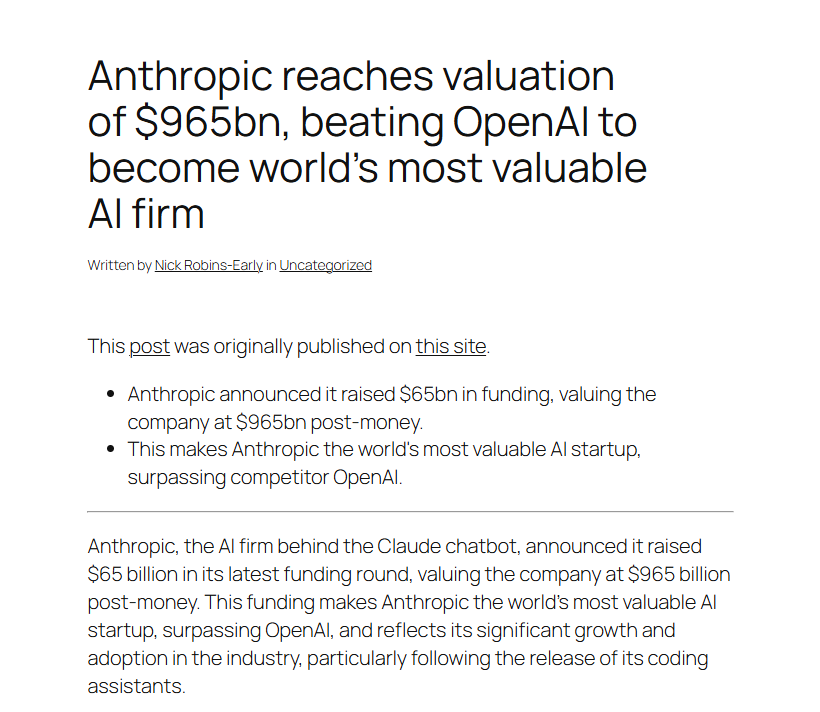
On archive and listing pages, prioritize scanning. Show the title, source, date, category, and the AI TL;DR or short summary. On individual post pages, keep attribution visible and link back to the original source.
If you want to keep readers inside a curated feed rather than sending every import into the blog archive, use Aggregator displays to build focused feed sections. If you want each imported item to have its own URL and SEO surface, use imported posts and category archives.
Step 8: Review the first imports
Before turning on automatic publishing, review the first imported posts from each source. This is where most quality problems show up.
| Problem | What it usually means | Fix |
|---|---|---|
| Too many irrelevant posts | The source is too broad or filters are weak | Add include/exclude rules or move the source to review-only |
| Duplicate stories from multiple publishers | The source list covers the same beat too tightly | Keep the stronger source, change categories, or review before publish |
| Weak summaries | The feed gives limited text content | Use full text import where appropriate or choose a better source |
| TL;DRs repeat the title | The imported item has too little body text | Use TL;DRs only on sources with enough article text |
| Credit usage rises too quickly | AI is enabled on too many low-value sources | Enable AI only on high-signal sources first |
After this review, move trusted sources closer to automation and keep noisy sources in draft or pending review. The goal is not to remove humans from the system. The goal is to remove repetitive work while keeping editorial judgment where it matters.
Example: an AI policy news aggregator
Imagine you want to build a site for founders who need to follow AI regulation without reading every legal update themselves.
The site rule might be: “Track legal, regulatory, copyright, privacy, and platform-policy updates that affect companies building or deploying AI products.”
Your first version could include:
- Official agency feeds for enforcement and guidance.
- Legal blogs that consistently explain AI-related cases.
- Research organization feeds for safety and governance reports.
- A Google News RSS feed for discovery, with strict keyword filters.
- A small number of high-signal technology publications.
Set official feeds and trusted legal blogs to import as drafts with AI summaries. Use TL;DRs for longer reports where founders need the key points quickly. Keep the broad Google News feed in review-first mode until filters prove they are catching the right stories.
The public site might have category pages for regulation, copyright, privacy, model safety, and platform policy. A weekly newsletter can then pull from the best imported posts rather than starting from a blank page.
Where AI Rewriting fits later
AI Rewriting is not part of this build workflow yet. For the current soft-launch setup, build around source quality, filters, AI Summaries, and AI TL;DRs.
When AI Rewriting is ready for your publishing workflow, treat it as an advanced editorial tool rather than the foundation of the aggregator. It should help with tone, readability, or consistency on selected sources. It should not be used to hide attribution or make imported reporting look like original reporting.
The practical order is: stabilize sources first, stabilize filters second, add summaries and TL;DRs third, then evaluate rewriting only where the imported content genuinely needs adaptation.
FAQ
What is the best AI news aggregator?
The best AI news aggregator depends on the job. For personal reading, consumer apps are usually faster to start. For publishing a niche news site, WordPress plus WP RSS Aggregator gives you more control over sources, pages, archives, categories, and editorial review.
Can WordPress be used for an AI news aggregator?
Yes. WordPress works well when you want to publish imported news as posts, organize it by category, build topic pages, and add a review workflow. WP RSS Aggregator handles the RSS source layer, while AI Summaries and AI TL;DRs help readers scan imported posts.
AI and RSS solve different problems. RSS is the reliable intake layer: it brings structured updates from sources you choose. AI is the processing layer: it can summarize or extract key points from imported items. A good aggregator uses both.
Should an AI news aggregator publish automatically?
Not at first. Start with drafts or pending review until you understand each source. After the first import checks are clean, you can allow trusted sources to publish automatically and keep broad or noisy sources in review.
How do AI Credits affect the workflow?
AI Credits are used when Aggregator runs AI-powered operations such as summaries, TL;DRs, and previews. Use AI on the sources where it improves the reader experience, and keep low-value discovery feeds filtered before they consume credits.
Build a smaller, better feed first
The strongest AI news aggregators are not the ones with the most sources. They are the ones with the clearest editorial promise.
Start with one audience, one beat, and a small source list. Import the best feeds as posts, filter before AI runs, and use AI Summaries or AI TL;DRs where they help readers move faster. Once the first version is clean, expand sources, add topic pages, connect the workflow to a newsletter, and increase automation source by source.
Get WP RSS Aggregator to build a WordPress news aggregator with RSS sources, filtering, imported posts, and AI-powered summaries.