X announced new creation tools Wednesday, many of them focused on short-form vertical video. The updates are part of the platform’s effort to compete with social networks such as YouTube and Instagram as the format continues to grow in popularity.
The tools are designed to help creators make professional-quality vertical videos, share original content more easily, and earn more. They also give creators more ways to record, edit, and publish content directly on the platform without relying on third-party apps.
A key addition is an upgraded media editor that lets creators produce polished vertical videos without leaving X. Recording features include the ability to capture video in segments and use green screen effects, the company said.
The editor also offers a range of post-production tools. Creators can convert horizontal videos to vertical format, automatically generate captions, trim footage, add text overlays, choose custom thumbnails, and adjust photos before publishing.
Thanks to a recently announced update, users can now add up to 20 photos and videos to a single post, which audiences can swipe through horizontally. X says the feature is intended for sharing event recaps, behind-the-scenes moments, and product launches.
Availability of the new features varies by region, X said.
Earlier this month, the company introduced a clipping feature that lets users take snippets from longer videos, add their own commentary, and post the clips without leaving X. Clips credit and link to the original video, plus the person who creates a clip and the original poster can earn from its views.
Another feature, “React with Video,” launched earlier this year. Similar to TikTok’s “stitch” feature, this lets creators respond to posts with video commentary while displaying the original post in the background.
X has also introduced new earning opportunities and updates to its creator monetization programs in recent months. These include the “Video Kickstart Bonus,” an invitation-only pilot that rewards selected creators for publishing original vertical videos under three minutes long and without watermarks.
The platform has also launched “Subscriber-only Group Chats,” which let creators host private, real-time conversations with paying subscribers. The feature is currently open to creators with 800 or fewer subscribers, and each group chat can accommodate up to 1,000 members.
When you purchase through links in our articles, we may earn a small commission. This doesn’t affect our editorial independence.
WhatsApp on Wednesday started rolling out a much-sought-after feature: the ability to schedule messages in both individual and group chats.
The feature is rolling out globally to all users across iOS and Android. Once it becomes available, you can type a message and long-press the send button to schedule it. You can choose to send a message anywhere between 10 minutes and 14 days later.
Users will be able to see all their scheduled messages and delete them if needed. It’s not clear if there is a way to edit the schedule of a message.
Notably, scheduled messages will be sent even if your phone is off or outside network coverage. You can schedule messages containing text, photos, and videos.
The feature could prove useful for wishing someone a happy birthday on time or chatting with people across time zones. Businesses may also find it easier to schedule texts and updates to their customers, and people who use the app to coordinate work will likely find themselves using scheduled texts to update their teams.
WhatsApp rivals like Telegram and Signal have had the ability to schedule messages for a while now, so the Meta-owned chat app is late in rolling it out.
U.S. insurer Allstate has been experiencing a tech outage since Monday morning, leaving customers nationwide unable to access their accounts, review their policy information, file claims, pay their bills, and more, just ahead of the U.S. Thanksgiving holidays.
The outage has been impacting both the company’s website and mobile app, TechCrunch confirmed.
Allstate’s outage is the latest in a series of disruptions to services such as Microsoft Outlook and Teams,the airlines, Apple Pay, and several banks. Trump Administration officials have said the outages are not being caused by cyberattacks, but are rather being caused by a recent set of upgrades to systems, many of which run on older technology. Those systems are now in need of more frequent security and bug fixes as AI makes it easier and faster to discover vulnerabilities.
At present, a message on Allstate’s website advises customers trying to log in that its services aren’t available, and that the company is “working to restore access as soon as possible.” On X, Allstate is employing what appear to be automated replies to customer complaints, asking them to DM the Allstate account with more information.
Downdetector, a crowdsourced outage-reporting website, shows users began reporting Allstate’s outage from Monday morning. However, the company hasn’t yet issued a formal statement about the disruption, what’s causing it, or when it may be resolved. In the meantime, local insurance agents have been fielding calls and emails from customers who aren’t able to use the company’s online services.
The timing of the outage is particularly bad given that Thanksgiving is a big travel holiday in the U.S., which means there will be car accidents. Customers will be left without a way to get in touch with their auto insurer to file claims and get roadside assistance through Allstate’s app.
Allstate did not immediately return a request for comment.
When you purchase through links in our articles, we may earn a small commission. This doesn’t affect our editorial independence.
Task management app Todoist said on Tuesday that a hacker gained access to its production systems and stole customer data, including email IDs, password hashes, and account creation dates. The company said around 6% of its customers were affected and blamed stolen credentials for the breach.
Todoist said the attacker used stolen credentials to access the company’s version control system and source code between November 22 and 23. The hacker then changed employee access controls and reached the app’s cloud infrastructure via an employee’s work account.
The hacker downloaded credentials of early Todoist users whose passwords were stored using an older hashing method, but didn’t change any source code, the company said. Todoist said it has blocked the attack path and reset passwords as a mitigation step, as well as disabled the Todoist for Outlook email add-on.
For a small number of people, about 0.001% of its userbase, the hacker also searched through tasks, comments and attachment names to look for credentials for other services, like API keys and access tokens.
The hacker also pulled Todoist API tokens and Slack integration tokens, and looked for emails, addresses, and attachment file names through the Todoist for Outlook extension if it was connected to accounts and had permission to read emails.
The company said it has sent a notice to those affected and asked them to reset their credentials and change their login details in other places with the same password. The company is asking users to also update API tokens, reconnect integrations, and revoke or replace any access keys, recovery phrases or credentials they had stored in Todoist comments.
Todoist said it has also reset its internal access structure and how remote command execution works in its cloud environment to prevent such incidents in the future.
Todoist’s founder and CEO, Amir Salihefendić, apologized to users about the incident on X, and said the company will take a closer look at why it happened.
The to-do app’s data breach is the latest in a burgeoning list of data breaches in which hackers use stolen credentials to access data and systems at enterprises. So far this year, we’ve seen several companies fall victim to this form of attack, including Uber and Klue.
When you purchase through links in our articles, we may earn a small commission. This doesn’t affect our editorial independence.
Amazon may be having a change of heart about Meta’s AI agent, Muse. The two tech giants are reportedly discussing a potential deal that would allow Meta’s popular AI agent to connect directly to Amazon’s store.
The talks would mark a significant reversal from just two months ago, when Muse users discovered they were unable to purchase products on Amazon and instead received an error message when attempting to check out.
According to a Wednesday report by Fortune, citing people familiar with the discussions, Amazon and Meta have held multiple rounds of talks about the matter. Two key issues remain under negotiation: how search results would be presented and how advertising would be handled under a potential agreement.
One of Amazon’s biggest concerns is how third-party shopping agents like Muse could affect its advertising business. In October, Amazon CEO Andy Jassy argued that few customers were making purchases through outside shopping agents.
Amazon may also have been waiting for Muse to mature before agreeing to integrate it with its marketplace. If Muse places the wrong order or creates a problem with a purchase, Amazon could ultimately be left dealing with frustrated customers and unhappy sellers.
Fortune reported that executives are concerned that third-party shopping agents could weaken Amazon’s direct relationship with consumers, according to people familiar with the matter.
Any potential agreement between Amazon and Meta would reportedly require approval from both companies’ CEOs, Fortune also reported.
Meta and Amazon have not yet responded to TechCrunch’s requests for comment.
Most news aggregator sites are a long list of links to other sites. Readers get a headline and little else.
Cryptoheadlines.com gives readers more. They get the day’s crypto news on one page, sorted by topic, with every article credited to the outlet that wrote it. On 17 November 2026, one story there held 104 articles from 23 outlets.
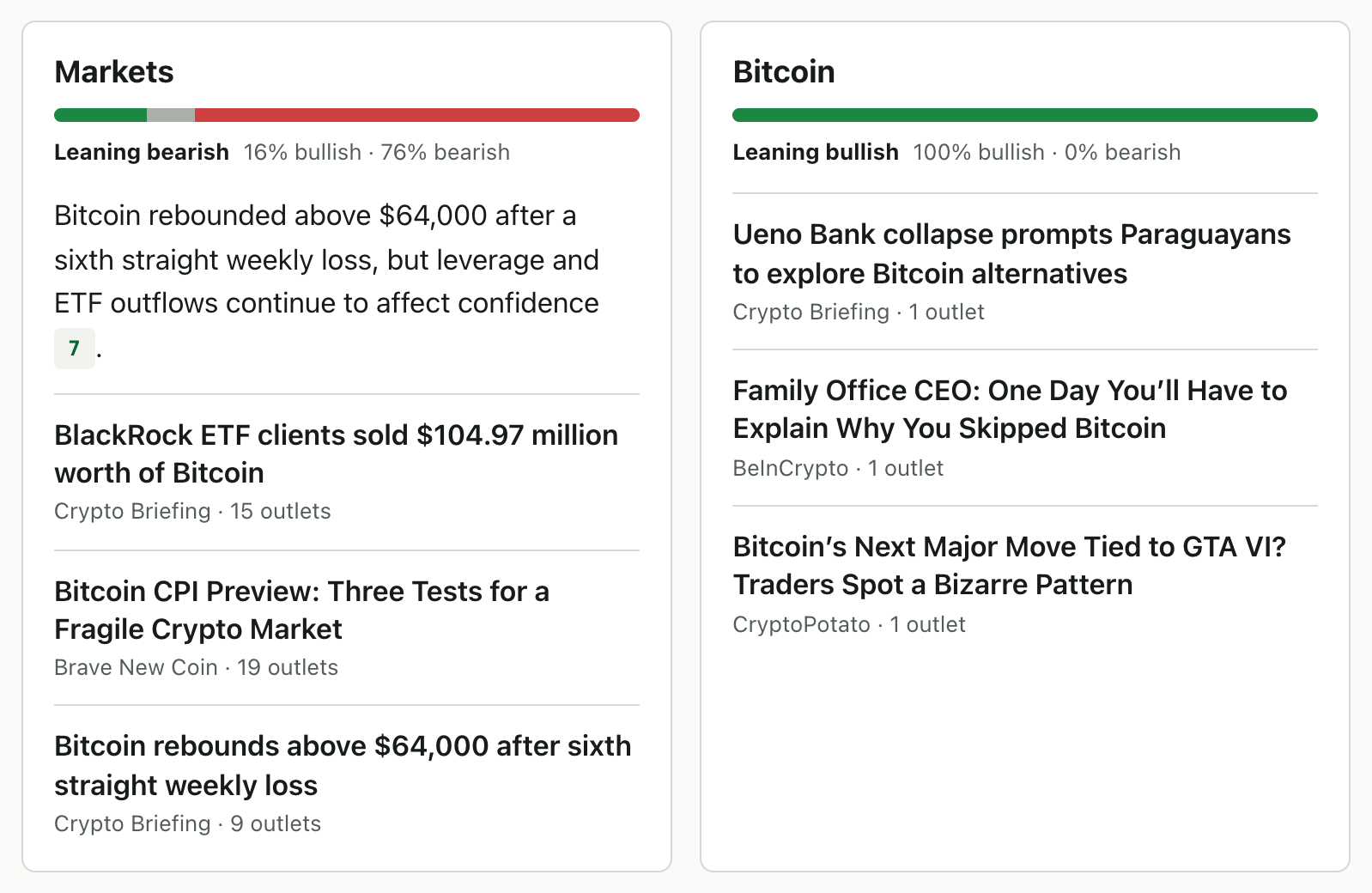
News sorted by topic on the cryptoheadlines.com homepage, 19 November 2026. Aggregator Pro brings in the articles; the site’s own code adds the mood bars, summaries and outlet counts.
The short version
Add the outlets you follow as sources.
Import posts that credit and link to the original.
Use keywords to keep imports on-topic.
Add AI summaries within your credit budget.
Put topic displays together on one page.
What’s Aggregator Pro, and what’s custom
Aggregator Pro brings in the articles from every outlet. The site’s own code then groups articles about the same event and ranks the stories. It also adds the mood bars, price displays and hourly roundup.
The five moves below cover the Aggregator Pro part, with no code. Developers can follow the build guide or the site’s how it’s built page for the rest.
Move 1: Collect your sources in WordPress
Cryptoheadlines.com collects feeds from outlets such as CoinDesk, The Block, Decrypt and Cointelegraph. When we looked on 17 November 2026, 47 of its top 60 stories had coverage from several outlets.
A story card on 19 November 2026 shows coverage from 26 outlets. Aggregator Pro imported the articles behind it.
Aggregator Pro checks the feeds on a schedule and skips items it has already stored. Each item keeps its headline, excerpt, publish time, image, source name and original link.
It also handles messy feeds. You can add, pause or replace sources from the WordPress dashboard.
The site’s owner, Jean Galea, chose WordPress for this import layer. As he put it in his build guide: “WordPress still does the hardest, most boring part of a news site better than anything I’d write from scratch.”
Add the outlets you follow as sources. These crypto feeds are set up on our test site.
Set it up on your site
Enter an outlet’s homepage URL in Feed Finder and copy its feed address.
In the WordPress dashboard, open Aggregator, then Sources. Click Add a new source and add the feed. Our guide to adding a source covers each field.
Under Update strategy, choose how often to check it. Repeat for your other sources.
Move 2: Import posts that credit the source
Cryptoheadlines.com stores the articles as feed items. Each one keeps the outlet name and a link to the original.
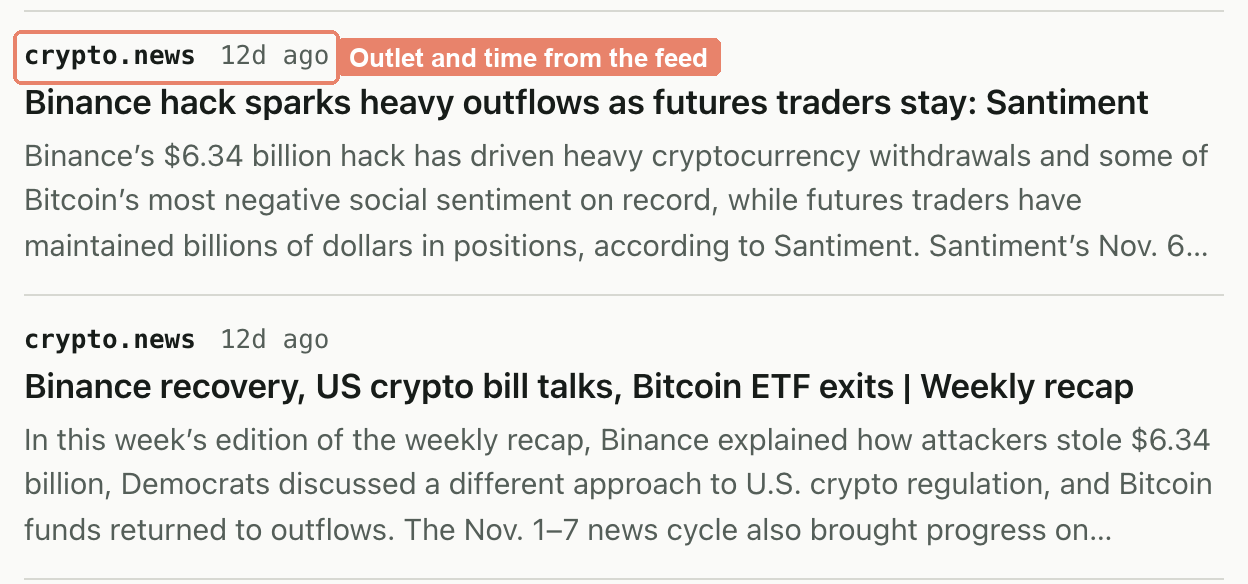
Articles on the Binance story page, captured on 19 November 2026. Each shows its outlet and publish time.
For your site, Feed to Post can turn imported articles into WordPress posts. They appear in your theme and site search, and Pro can add a credit line linking to the original.
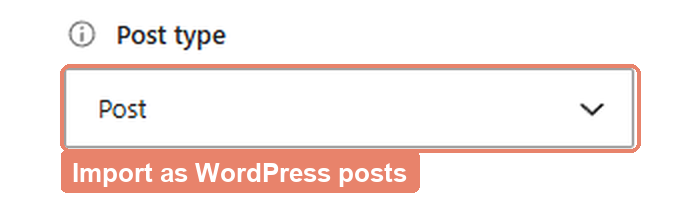
Example attribution setting, shown as a mock-up: the credit line added to each post from this source.Choose Post to import articles as WordPress posts.
Turn on Set canonical link to identify the original article as the primary version for search engines. These imported posts give readers a way to browse news on your site.
If you import full articles, check each outlet’s terms first. Republishing a whole story can need the publisher’s permission. Our guide to posting RSS feeds to WordPress covers attribution and full-text import.
Set it up on your site
Open a source and set Post type to Post.
Choose Post status. Use Draft to check imports before they go live, or Published to publish them as they arrive.
Turn on Set canonical link. See canonical links for what it changes.
Go to Advanced, then Attribution. Turn on Show Attribution and edit the Attribution Text to name the outlet and link to the original. Save and fetch the source. The attribution guide lists the text options.
A source may cover more than your readers need. On 17 November 2026, a story about Anthropic’s business led the cryptoheadlines.com data feed, with coverage from 17 outlets.
The site files stories by topic. Its Regulation page shows how a topic gives readers a smaller set of stories to browse.
Stories on the cryptoheadlines.com Regulation page on 19 November 2026, each tagged with its topics.
For your imports, Aggregator Pro can check titles for keywords before saving an article. Choose the words that fit your subject in the source’s Automations tab.
Example rule, shown as a mock-up: import only titles containing one of these crypto keywords.
Set it up on your site
Open the source’s Automations tab.
Choose Title, then Contains any. Enter your keywords.
Set Then to Import item and save. Articles without a matching word stay out.
The cryptoheadlines.com homepage opens with a roundup, written by the site’s own code. Each sentence links to the article behind it, so readers can check the source.
On your imported posts, Aggregator Pro offers AI Summaries and AI TL;DRs. AI Summaries adds a short paragraph. AI TL;DRs adds bullet points so readers can scan the main points.
The one-site Pro plan includes 500 AI credits a year, or about 40 a month. Each summary or TL;DR uses one credit. Our page on AI credit usage explains what else counts.
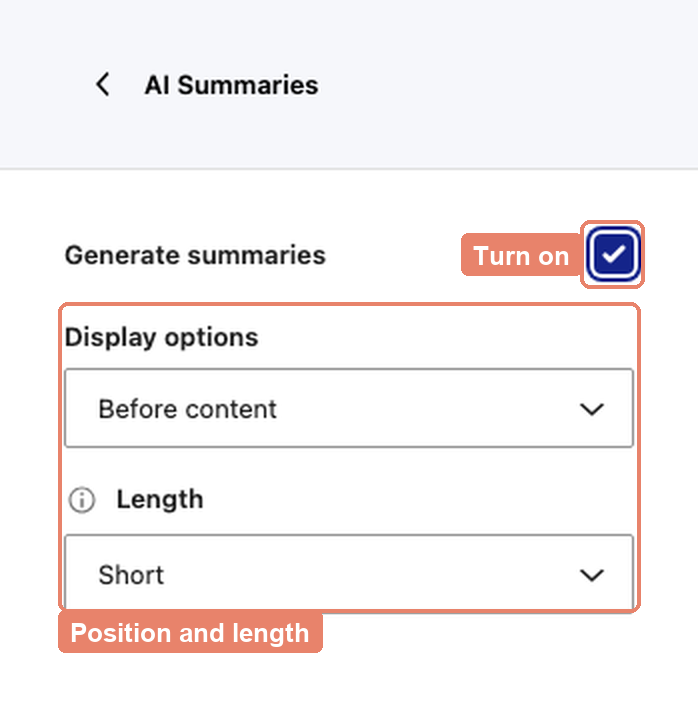
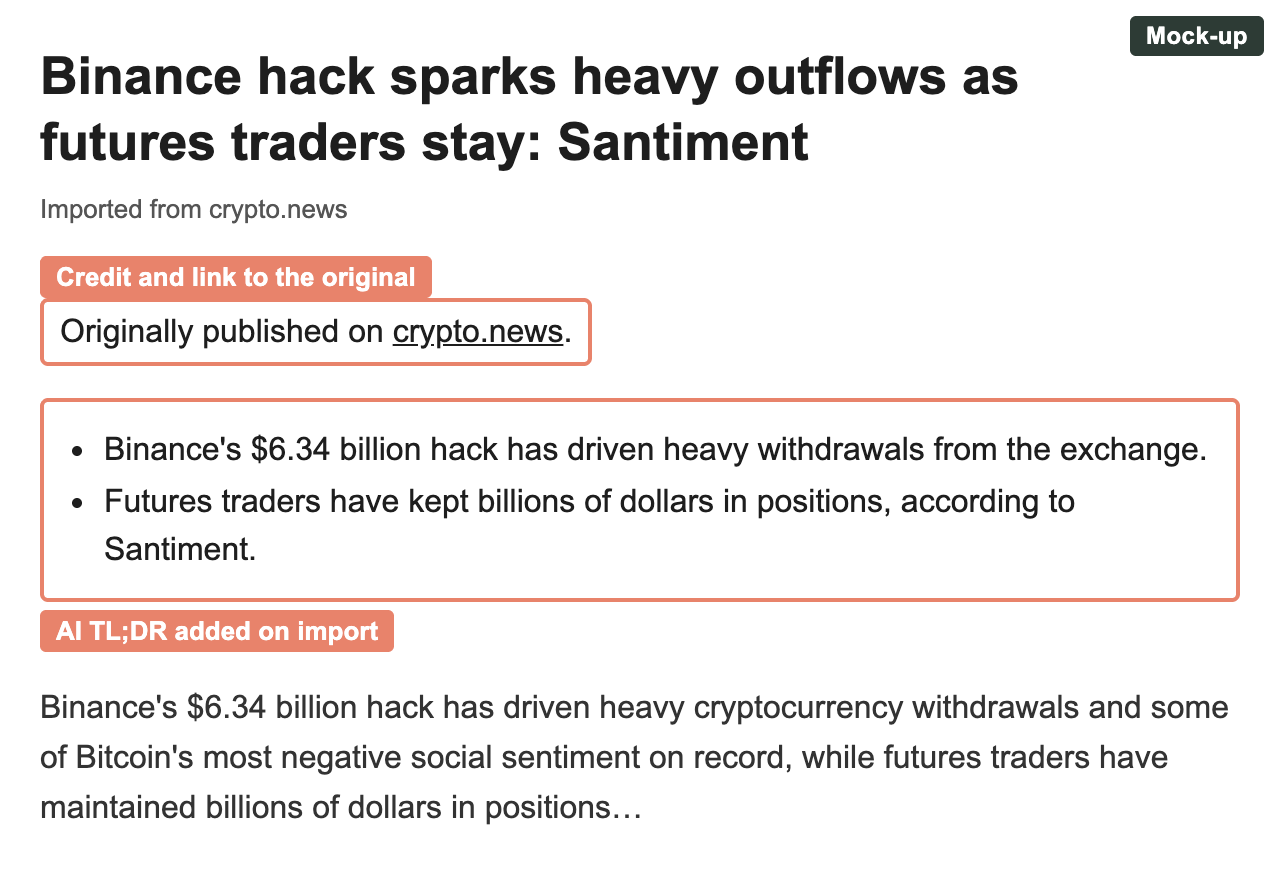
Turn on AI Summaries, then choose its position and length.Example post, shown as a mock-up: a source credit and an AI TL;DR above the imported text.
Refreshes use credits too. This includes clicking Fetch or Update when a source is set to keep items up to date.
On our test site, one CoinDesk fetch brought in 25 articles. Start with one source and filter its imports before turning on summaries. Extra credit packs are available if you need more.
Set it up on your site
Open your filtered source. Go to Advanced, then AI, then AI Summaries.
For a short paragraph, tick Generate summaries. Choose where they appear and how long they are.
For bullet points like the example above, use AI TL;DRs on the same source instead.
Under Credit Strategy, choose Import items without AI summaries. New articles can then keep arriving when credits run out.
Move 5: Put news topics on one page
Cryptoheadlines.com breaks the news into sections, as in the screenshot at the top. Readers can browse markets, Bitcoin, regulation, DeFi and security.
In WordPress, you can make one Aggregator display for each topic. Stack the displays under headings on a single page so readers can find the news they came for.
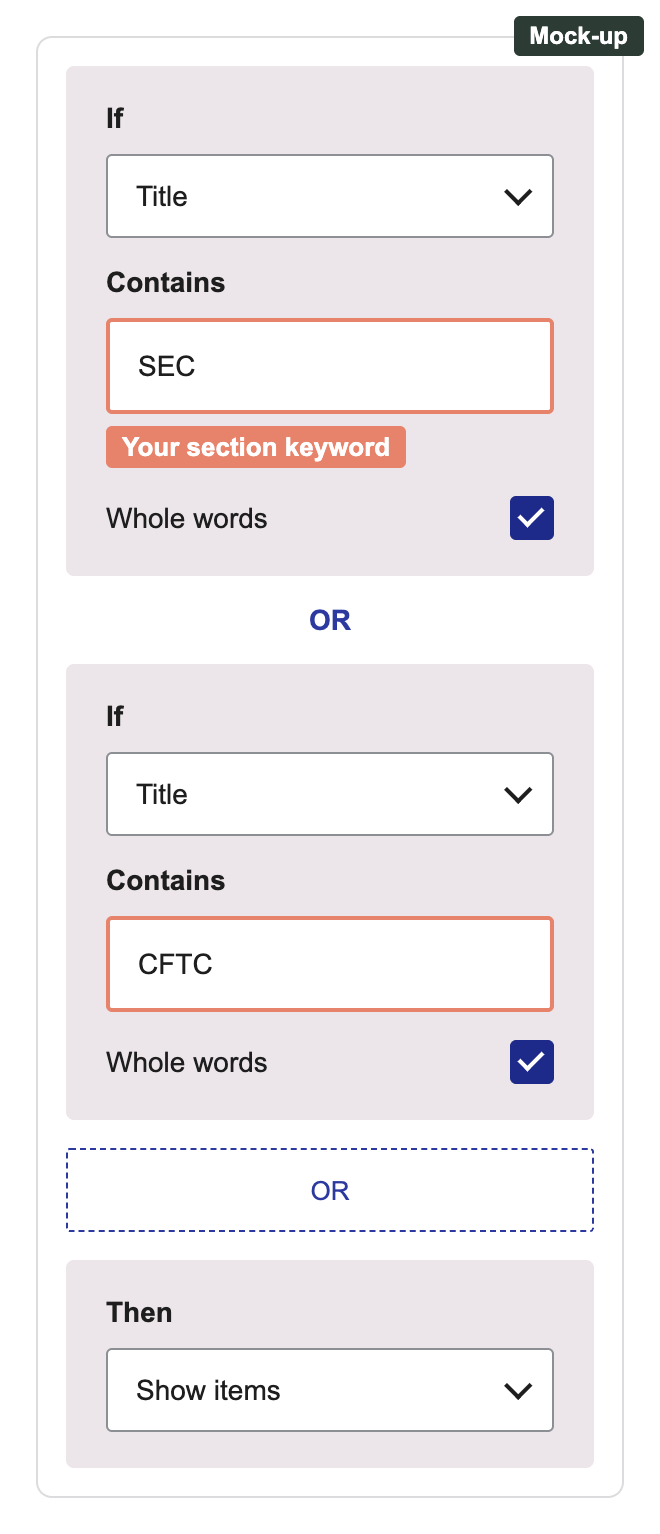
Example display filter, shown as a mock-up: show titles containing SEC or CFTC.Example page, shown as a mock-up: two filtered displays stacked under topic headings.
Set it up on your site
Open Aggregator, then Displays. Click Create a new display and choose your sources.
Open Filtering. Choose Title and enter a topic keyword under Contains, such as SEC.
Tick Whole words. This keeps a word such as SEC from matching security.
Set Then to Show items. Add other keywords with OR, then save. The filter matches your words, not related terms. See display filters for more rules.
Make a display for each topic. Add them to one page with the Aggregator block, each under its own heading.
Start with one feed
Add one outlet as a source today and import a day of posts as drafts. Check what comes in, then add your keywords, summaries and topic pages.
Add a few more outlets, and you have a news page readers can check every morning.
Aggregator Pro for WordPress
Turn your feeds into a news page
Pick the outlets you trust. Aggregator Pro brings in their newest stories, keeps them on-topic and adds summaries, each one credited and linked to the publisher.
RSS and Atom are two XML formats for the same job: a file that lists a site’s newest posts so apps can pick them up. The real difference is the rules: Atom requires an ID, a title and an update time on every post, while RSS is older and looser. It only matters for podcasts, which need RSS; for reading feeds or importing them into a website, either format works.
We make Aggregator, a WordPress plugin that imports both formats, so we ran the same feeds through it to see what actually changes. Here’s what we found:
The same WordPress.org News post came out identical from RSS and Atom, except that only Atom added the time the post was last edited.
Atom requires a permanent ID on every post, which is what an importer uses to skip posts it already has. In RSS the ID is optional, so when it’s missing, Aggregator uses the post’s link instead.
YouTube’s Atom feed keeps each video’s description in a separate media element, so a basic importer gets only the title.
Both formats are written in XML: plain text where each piece sits between labels, like <title> and </title>. RSS and Atom often name the same piece differently, so a post’s date is pubDate in RSS and published in Atom.
Compared
RSS
Atom
Looked after by
The RSS Advisory Board
The IETF, which sets internet standards. The rules are in a document called RFC 4287
Current version
RSS 2.0.11, from March 30, 2009
Atom 1.0, from December 2005
The file starts with
<rss>
<feed>
One post is called
an item
an entry
Every post must have
a title or a description
an ID, a title and an “updated” time
Dates look like
Tue, 03 Nov 2026 15:45:29 +0000
2026-11-03T15:45:29Z
Says whether text contains HTML
No
Yes
Summary and full post
One description element; the full post needs an add-on element
Separate summary and content elements
Records when a post was last edited
No
Yes
Accepted by Apple Podcasts
Yes
No
Atom came from people who found RSS too vague. RSS never says whether a post’s description is plain text or HTML (the code that formats web pages), and it lets a post go without an ID. Atom spells out both.
What is an Atom feed?
An Atom feed is a feed written in the Atom Syndication Format, which the IETF published in December 2005. You follow one the same way as an RSS feed, by pasting its address into a feed reader or a plugin. YouTube channels, GitHub releases, Blogger blogs and Google Alerts all send Atom.
RSS vs Atom: the same post in both formats
WordPress makes both formats for every site, so it’s a fair comparison. Here’s the same WordPress.org News post as RSS and as Atom. Tap a line on either side to see its partner.
wordpress.org/news/feed/
Atom wordpress.org/news/feed/atom/
guid in RSS, id in Atom
A permanent ID. Apps use it to recognize a post they’ve already shown you. It’s optional in RSS and required in Atom. WordPress puts the same ID in both.
All ten pairs explained
item in RSS, entry in Atom
One post. RSS calls it an item, Atom calls it an entry.
title in RSS, title in Atom
The headline. Atom adds type=”html” so apps know how to display it.
link in RSS, link rel="alternate" in Atom
The address of the post on the website.
dc:creator in RSS, author in Atom
Who wrote it. RSS borrows this element from an add-on called Dublin Core. Atom has its own, with a name and a profile link.
pubDate in RSS, published in Atom
When the post went live. Same moment, two date styles.
Nothing in RSS, updated in Atom
When the post was last changed, five minutes after publishing here. RSS has no element for this. Atom requires it.
guid in RSS, id in Atom
A permanent ID. Apps use it to recognize a post they’ve already shown you. It’s optional in RSS and required in Atom. WordPress puts the same ID in both.
category in RSS, category term in Atom
The post’s categories and tags.
description in RSS, summary in Atom
A short summary of the post.
content:encoded in RSS, content in Atom
The full post. RSS needs an add-on element for it. Atom has one built in.
Shortened and simplified for space. The real entries list five categories and the whole post.
Most of it matches: the whole post, the same ID and the same publish time. That’s because WordPress.org chose to send everything in both formats. Our own blog sends only summaries, in RSS and Atom alike.
Which sites use RSS and which use Atom
Most feeds you’ll meet are RSS. Atom shows up on Google’s YouTube, Blogger and Google Alerts, and on GitHub. We opened every feed below and loaded each one into Aggregator on a test site. All of them worked except Reddit’s, which blocked our test server, and GitHub’s RSS address, which doesn’t exist.
Feed
Address
Format
The Verge
https://www.theverge.com/rss/index.xml
AtomAddress says RSS
Reddit (r/WordPress)
https://www.reddit.com/r/WordPress/.rssUntil November 13.
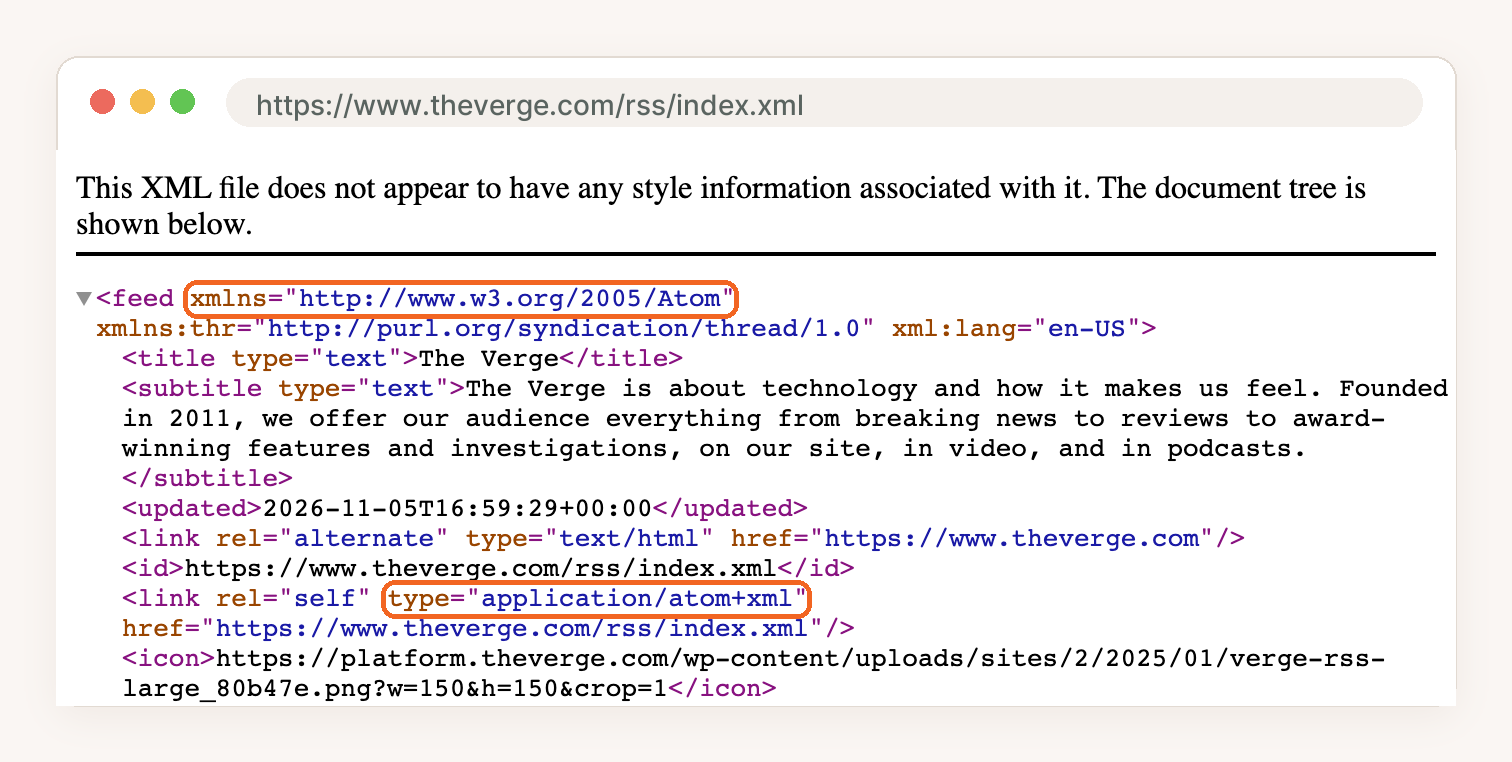
You can’t judge a feed by its address. The Verge’s feed lives at theverge.com/rss/index.xml, but the file is Atom. Reddit’s .rss feeds are Atom too, until Reddit turns them off on November 13. Here’s The Verge’s feed opened in Chrome:
The address says rss, but the first element is <feed> in the Atom namespace.
Open the feed in your browser: an RSS file starts with <rss> (with <channel> inside it, not on top), and an Atom file starts with <feed xmlns="http://www.w3.org/2005/Atom">. Don’t trust the web address or the file type the server sends: six of the 14 working feeds we tested called themselves plain XML. Or paste the first few lines into the checker below, which runs in your browser and fetches nothing.
Is this feed RSS or Atom?
Try a sample:
If a feed won’t load at all, a feed validator will show what’s broken.
On paper, yes. Atom is stricter and leaves less for apps to guess. In practice RSS is far more common.
In a May 2023 sample of home pages by the HTTP Archive, half pointed to an RSS feed and only 8% to an Atom feed. The real Atom share is a little higher, because WordPress makes an Atom feed for every site but only links the RSS one in its page code.
What it means for you depends on what you’re doing:
If you read feeds in an app, the format doesn’t matter. Use whichever address you have.
If you show other sites’ posts on your WordPress site, it doesn’t matter either, as long as your plugin reads both.
If you publish a blog, keep the format your platform makes. Both work everywhere.
If you publish a podcast, use RSS. Apple Podcasts requires RSS 2.0.
Aggregator reads feeds with SimplePie, the feed-reading code that comes with WordPress, and that’s how we ran the test above. It also reads each YouTube video’s description from that media element, so imported videos keep it.
One thing no format fixes: if a site’s feed carries only a summary, that’s all you get, in RSS or Atom. Aggregator Pro’s full text import fetches the rest of each article from the site.
Keep what your platform makes. WordPress already serves RSS 2.0 at yoursite.com/feed/ and Atom at yoursite.com/feed/atom/, plus two older formats. If you move your main feed to a new address, anyone who subscribed to the old one stops getting your posts, unless the old address redirects to the new one.
To put other sites’ posts on your own site, start with the feed’s address. Here’s how to find any website’s RSS feed. Then add it to Aggregator as a source and show it on a page with the Aggregator block or shortcode. To publish the items as WordPress posts instead, follow our guide to importing RSS feeds into WordPress posts.
Turn these feeds into a page that updates itself
Pick any feed from this article, RSS or Atom, and add it to Aggregator. The free plugin checks it on a schedule, hourly unless you change it, and adds each new post to your WordPress page.
yoursite.com/news/
Today’s reading
Interest rates hiked to 4% in first increase in over three years BBC News · Nov 5, 2026
The FAA is finally ditching floppy disksAtom The Verge · Nov 5, 2026
WordPress 7.2 Beta 4Atom WordPress.org News · Nov 3, 2026
FAQ
Can an RSS reader read Atom feeds?
Yes. “RSS reader” is just the common name for any feed reader, and they’re made to read both. NetNewsWire’s help page, for example, says it handles RSS, Atom and JSON Feed.
Can I convert an Atom feed to RSS?
You can, with an online converter, but there’s rarely a reason to: anything that reads feeds takes Atom as it is. A converter also adds a second address that stops updating if the service shuts down.
Is an RSS feed an XML file?
Yes. RSS and Atom feeds are both XML files, which is why your browser shows a page of tags when you open one.
Is RSS still used in 2026?
Yes. Podcasts run on RSS, and plenty of news sites and blogs still publish feeds. Our guide to what an RSS feed is shows real ones you can open.
What about JSON Feed?
JSON Feed is a third format that does the same job in JSON instead of XML. Fewer apps read it than RSS or Atom, and Aggregator doesn’t.
Why does my WordPress site have an Atom feed I never set up?
WordPress makes one for every site, next to the RSS feed. Add /feed/atom/ to your site address to see it. You don’t have to do anything with it.
Most big news sites still publish RSS feeds that work. The BBC, NPR, The New York Times, Bloomberg and The Guardian all had fresh stories in theirs when we checked in October 2026, and the tables below have their addresses plus dozens more.
A few famous feeds are a different story. CNN’s still loads, but the newest item in it is from May 2023. Reuters shut its feeds down in 2020, and AP’s own feed now blocks readers.
Those dead addresses still get passed around, so we’ve listed them too, along with what to use instead.
You’ll also find what each publisher allows if you want their headlines on your own site, and how to set that up in WordPress.
For general news, start with these five. They post all day and come with images.
NPR and The Guardian are free to read. The New York Times feed is free as well, though most of the stories it links to are for subscribers.
Best RSS feeds for breaking news
Pick a busy feed. The Independent’s news feed posted more often than any other we checked, with a new story every few minutes. Fox News and Al Jazeera weren’t far behind.
Fox News and Axios send the whole article. Nice for reading. On your own site, you’d still show an excerpt and link back.
Everyone else on this list keeps it to a headline and a sentence or two.
Politico splits its news into topic feeds, and some of them barely move. Its economy feed had three stories in it when we looked. Stick to politics and congress.
Headlines about that ticker (swap AAPL for any symbol)
Wall Street Journal readers should check their feed address. The current feeds live on feeds.content.dowjones.io. The old feeds.a.dj.com addresses still load, but nothing new has landed in them since January 2025.
That catches a lot of people, because some popular feed lists (and even Google’s AI answers) still hand out the old ones. MarketWatch moved to the same Dow Jones address.
Yahoo Finance dropped its general news feeds. You can still follow the headlines for one stock at a time, like Apple in the table above.
rss.feedsportal.com/… (still linked from its own RSS page)
Gone.
https://www.independent.co.uk/news/rss
To check a feed yourself, open its address in your browser and look at the date on the top story. Some browsers show raw code instead of a tidy page. Search that for pubDate, and the first one you hit is the newest story.
On a news site, anything weeks old means the feed is dead, even though it loads.
Reddit’s feeds are next. Reddit ends RSS support on November 13, so if you follow news through subreddits, those feeds will stop updating. Our Reddit RSS guide covers what changes and what to use instead.
Google News can build a feed for a site that no longer has one. This address returns the latest Reuters stories:
Swap reuters.com for any other site. Keep when:24h, or the feed fills up with old stories. When we left it out for USA Today, one result was from 2006.
To get a single section, add it to the address, as in site:reuters.com/world. That only works when a site puts its sections in its web addresses. AP doesn’t, so add a keyword instead: site:apnews.com politics.
These are fine for reading. Put them on a site and you’ll notice a few quirks:
Stories arrive without images, just a headline and a line of text.
Every link opens news.google.com first, then redirects to the article.
The publisher’s name is stuck on the end of each headline, as in “Nvidia wins fast-growing AI startup Modal for new central processors – Reuters”.
“We encourage the use of BBC News feeds as part of a website, however, we do require that the proper format and attribution is used when BBC News content appears.”
Its RSS content is available “for personal use (e.g., in a news reader), for many commercial purposes, or for any other form of distribution to a third party.”
“you are only permitted to display the content that is provided in the feed, with attribution to TechCrunch, and you must link to the full article on TechCrunch. You may not incorporate advertising into any TechCrunch RSS feed.”
“We allow the use of NYTimes.com RSS feeds for personal use in a news reader or as part of a non-commercial blog. We require proper format and attribution whenever New York Times content is posted on your website.”
“for your personal, non-commercial use only and any republication or other use of our content will require a licence.”
The safe way to show any of these on a site is the headline, a short excerpt and a link back, with the publisher’s name kept on it. Running ads against someone else’s feed is off limits under several of these terms, CNN’s and TechCrunch’s included.
A site that earns money needs a closer read of each publisher’s terms, and an email to the publisher is the quickest way to a clear answer. (This isn’t legal advice.) Our guide to posting news articles on your website goes into more detail.
Which news feeds look best on a website
In a reader app, one feed looks much like another. On a web page, the gap is obvious. Some feeds bring a photo and a couple of lines with every story. Others bring a bare headline.
BBC News feed
Photo included
Watch: Are the French riots a warning of an intense election to come?
Rioting, looting and vandalism has gripped France over the weekend after protests spiralled out of control across the country.
Summary: one lineLink goes to: bbc.co.uk
Reuters via Google News feed
No image
Kenyan starvation cult leader convicted in deaths of nearly 200 children – Reuters
Kenyan starvation cult leader convicted in deaths of nearly 200 children Reuters
Summary: none beyond the titleLink goes to: news.google.com, then redirects
One real story from each feed, side by side.
Pictures are the norm. Bloomberg, CNBC, ESPN, TechCrunch, Al Jazeera and Deutsche Welle don’t, and neither does any Google News feed.
Text varies more. A sentence or two is typical. The Guardian often sends a full paragraph, and Fox News, Axios and Business Insider send the whole article.
For a page that looks like a real news site, lean on the feeds with pictures. Put the rest in a plain headline list or a sidebar.
Aggregator, our WordPress plugin, turns any of these feeds into a news page that keeps itself up to date. The free version is all you need to get started.
1. Add a feed as a source
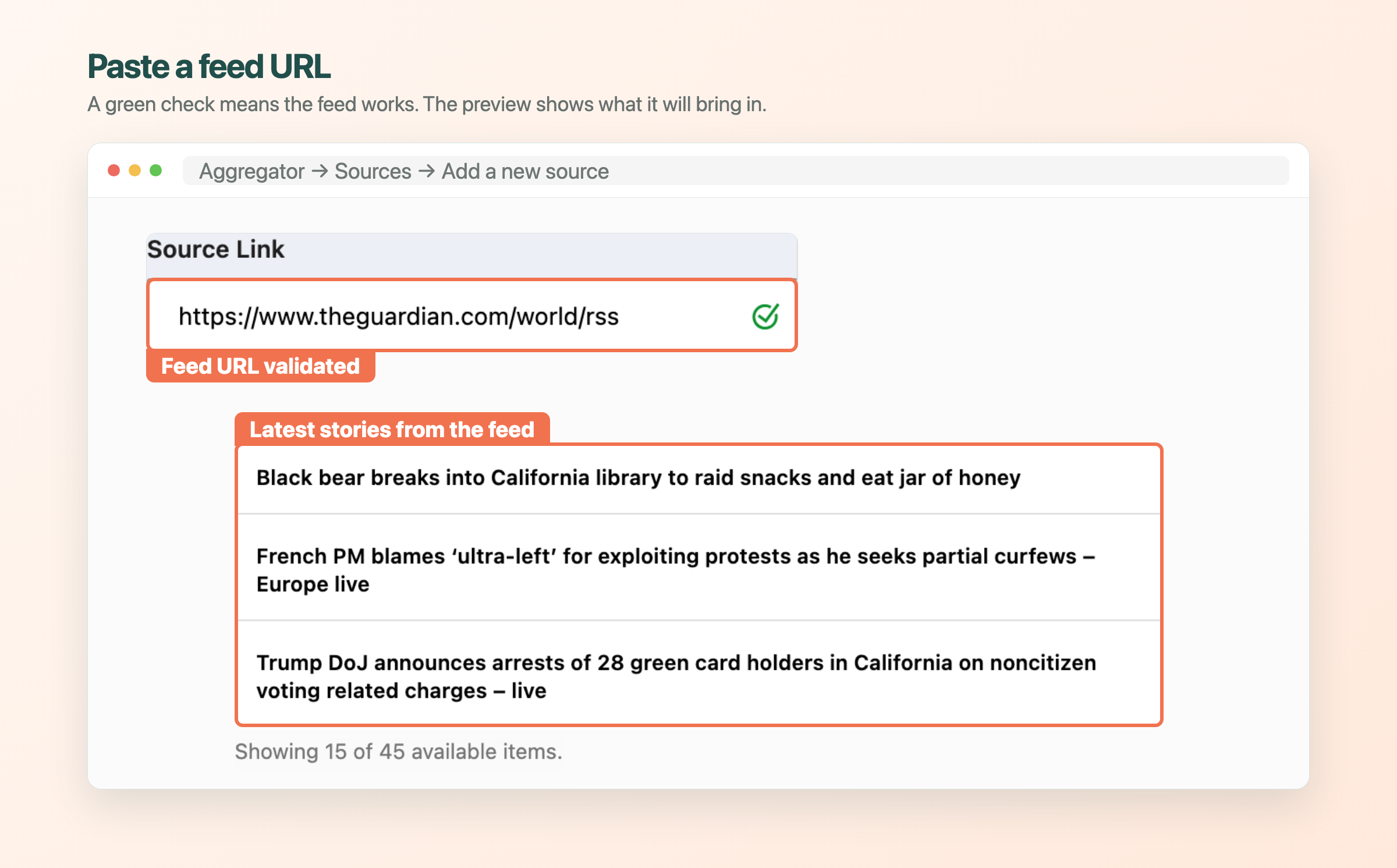
Install the free Aggregator plugin. In your WordPress dashboard, go to Aggregator > Sources, click Add a new source and paste in a feed address from this page.
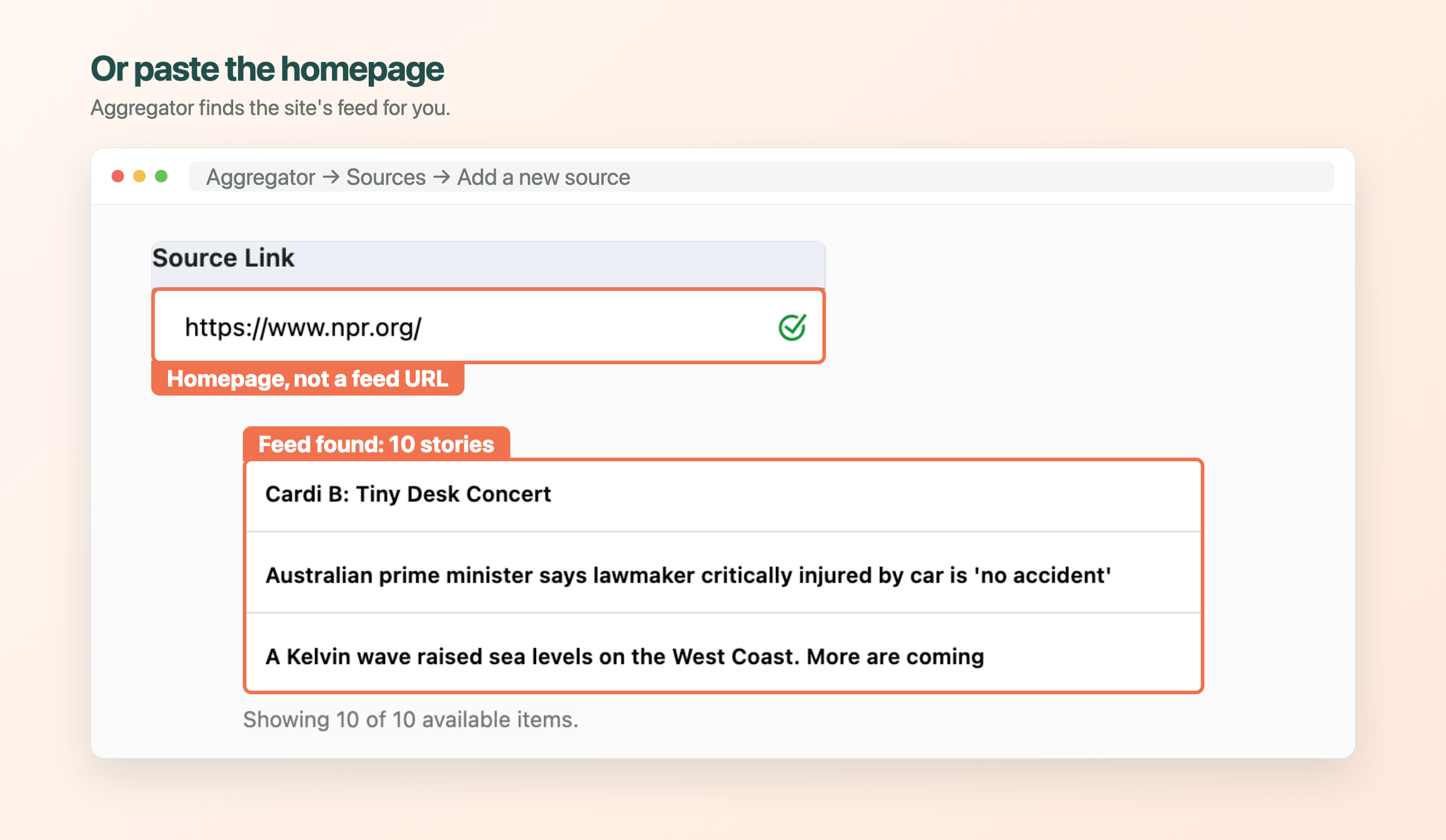
A green check means the feed works. The preview next to it shows the latest stories.
For many sites you don’t even need the feed address. Paste the homepage and Aggregator finds the feed for you. That’s how we added NPR. We pasted npr.org, and it picked up the feed on its own.
Click Save, then Import, and repeat for each outlet.
2. Show the stories on a page
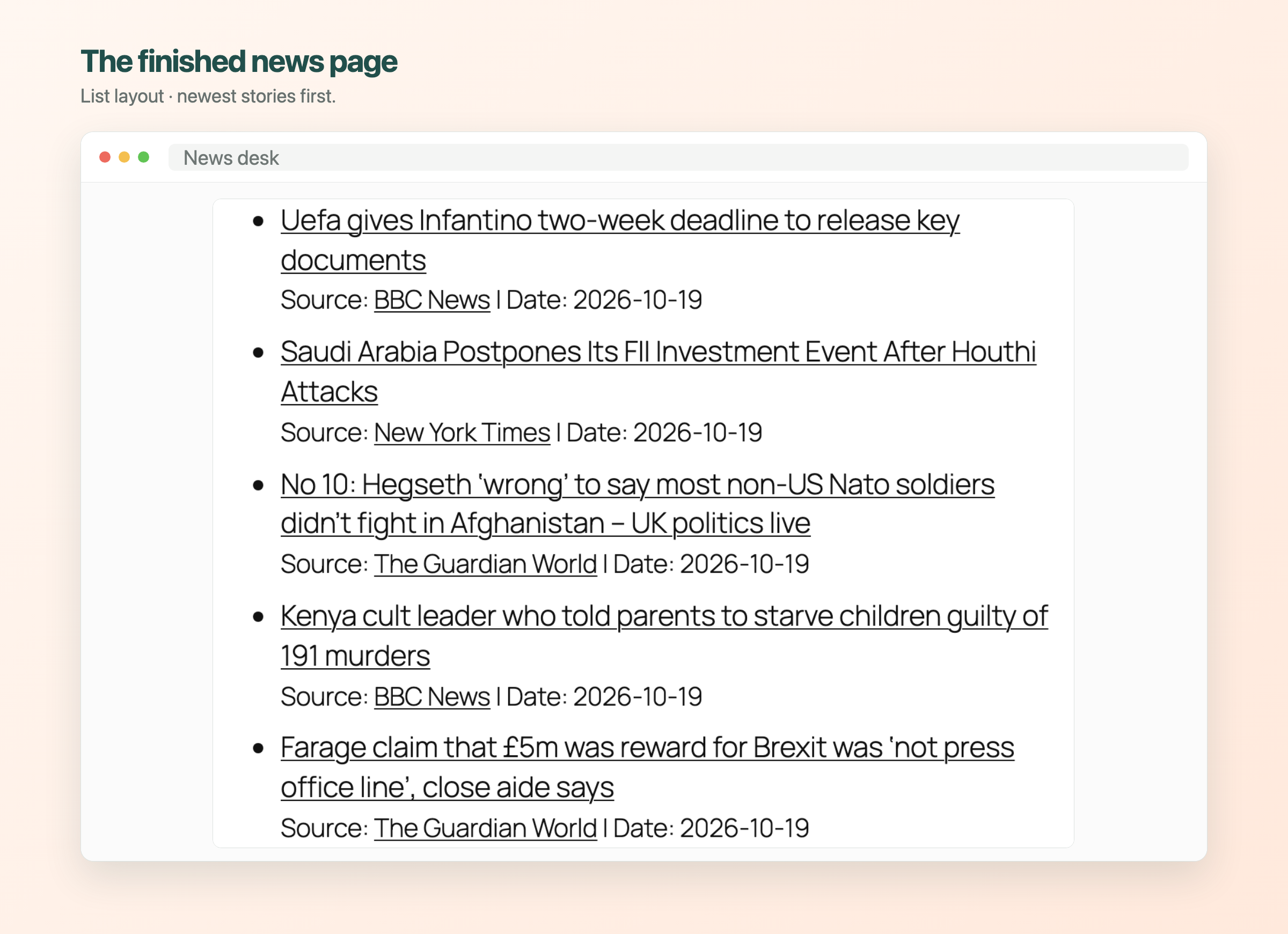
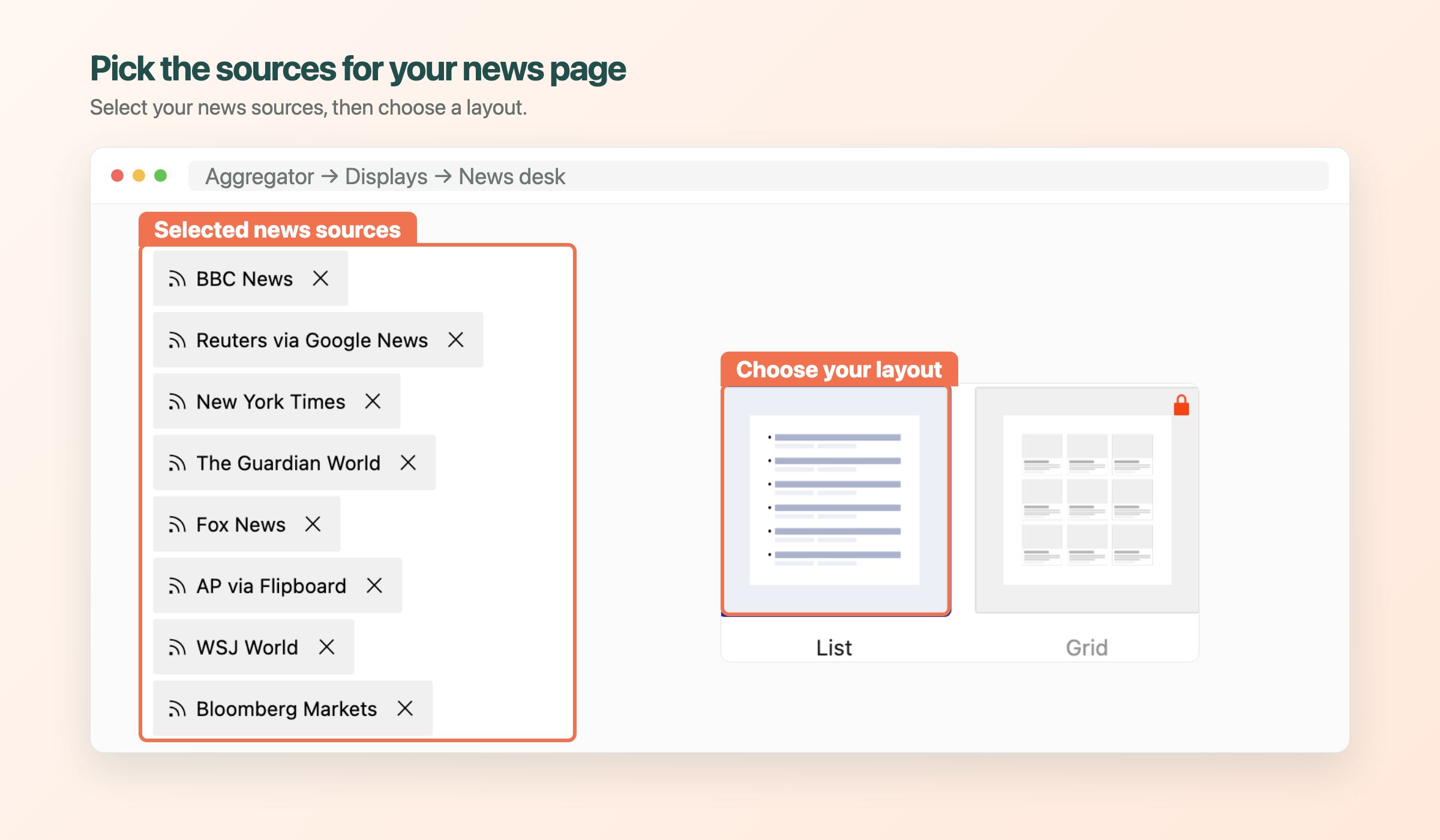
Go to Aggregator > Displays and click Create a new display. Choose your sources and how many stories to show, then add the display to a page with the Aggregator block or the [wp-rss-aggregator] shortcode.
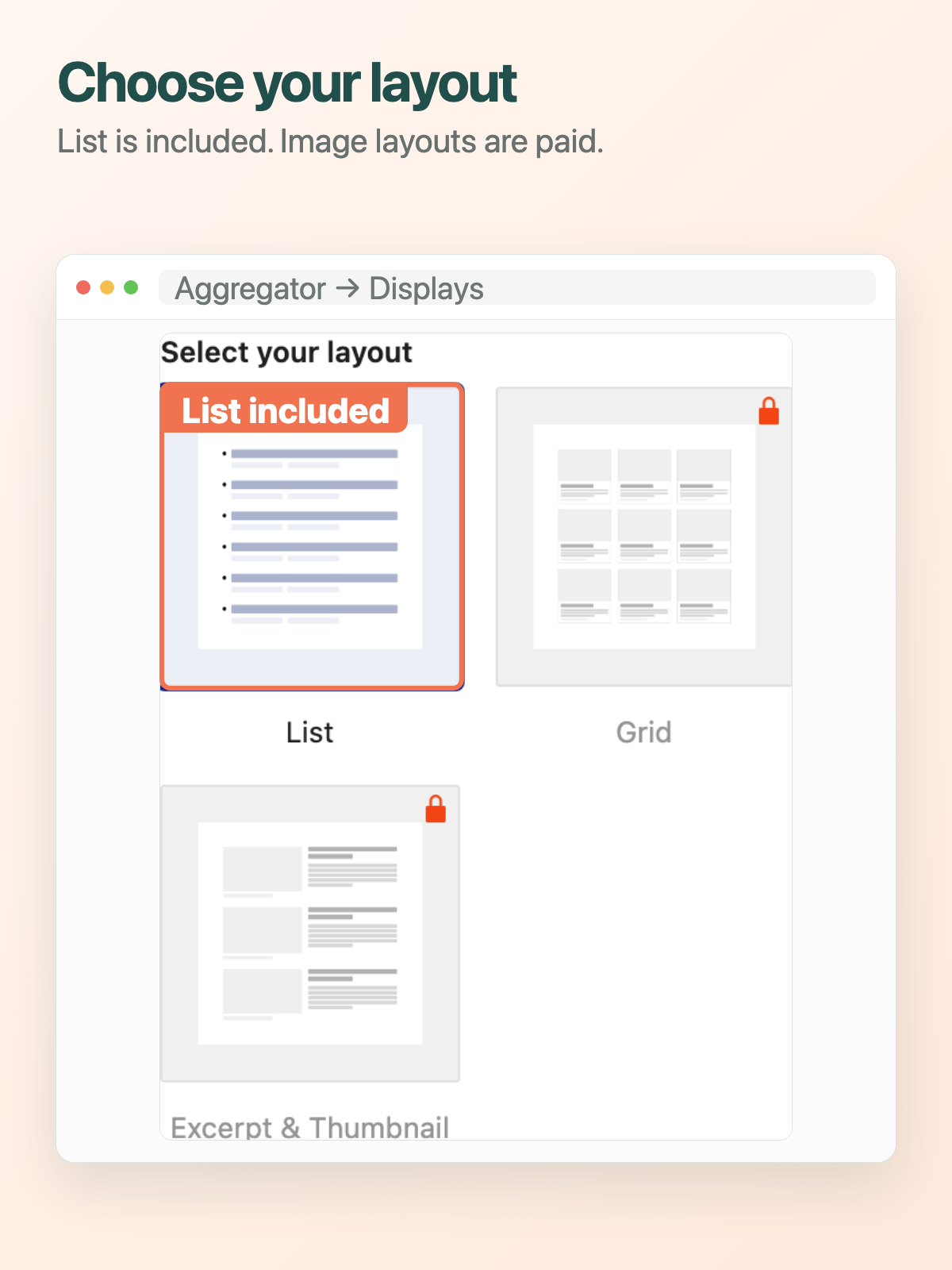
The free plan uses the List layout, which shows each headline with its source and date underneath.
New stories appear on the page as the feeds update, newest first.
3. Add images, folders and filters when you need them
A headline list works well in a sidebar or a “latest news” box. When you’re ready for a full news page, the paid plans add:
Grid and Excerpt & Thumbnail layouts show a picture and summary for each story. That’s where feeds with images, like the BBC, NPR and The Guardian, look their best. (Basic plan)
Folders group your sources, so one display can show world news and another business. (Basic plan)
Keyword filters keep only the stories that match. Point one at a Google News feed for reuters.com, filter for “markets”, and you have a Reuters markets feed. (Basic plan)
Import as posts turns each story into a regular WordPress post with its featured image, so it fits your theme’s layouts and site search. (Pro plan)
Paid plans start at $99 a year. You can compare them on the plans and pricing page.
Download every working feed in one file
All 111 working feeds we found are in one file, sorted by topic. That’s more than the tables show.
It’s an OPML file, a standard list of feeds that Feedly, Inoreader and NetNewsWire can import in one go.
The full list is below too, if you’d rather copy feeds one at a time.
Yes, lots of people. Feedly, Inoreader and NetNewsWire are all built on RSS, and 35 of the 38 big news sites we checked still publish a working feed.
What does RSS mean in news?
RSS stands for Really Simple Syndication. For a news site, the RSS feed is a list of its latest stories that updates as new ones go up, usually with a headline, a short summary and a link. Reader apps and plugins like Aggregator check that list and pull in anything new.
What is replacing RSS feeds?
For news sites that dropped RSS, it’s mostly their own apps and email newsletters. Search for Reuters’ RSS feed, and Reuters’ own result is a page asking you to get the Reuters News app. Inside a feed reader, the practical replacement is a Google News feed for that site, or a Flipboard feed where the outlet has one, as AP does.
Which news sites have RSS feeds?
Most of the big ones, including the BBC, The New York Times, NPR, The Guardian, Fox News, NBC News, CBS News, Bloomberg, The Wall Street Journal and The Verge. CNN, Reuters and USA Today no longer have working feeds.
What is the best RSS feed for news?
BBC News, NPR and The Guardian are the safest picks for general news. All three post all day and include images, and NPR and The Guardian don’t charge to read.
Does Google News have an RSS feed?
It does, through search. Put any search after https://news.google.com/rss/search?q= and you get a feed of the results. It’s also the easiest way to follow a site with no feed of its own.
Does CNN still have an RSS feed?
Not one that still updates. CNN’s RSS page is online, but its feeds stopped getting new stories in 2023 and 2024. A Google News feed for cnn.com is the workaround.
Does Reuters have an RSS feed?
No. Reuters ended its public feeds in June 2020. A Google News feed for reuters.com does the same job today.
Does the Associated Press (AP News) have an RSS feed?
AP’s own feed address blocks readers now. Its official Flipboard account has a working feed at https://flipboard.com/@AssociatedPress.rss, and each story links straight to apnews.com.
Does the Wall Street Journal have an RSS feed?
It does, on a new address. The world news feed, for example, is https://feeds.content.dowjones.io/public/rss/RSSWorldNews. The old feeds.a.dj.com addresses stopped updating in January 2025.
Does the New York Times have an RSS feed?
Dozens of them. The home page feed is https://rss.nytimes.com/services/xml/rss/nyt/HomePage.xml, with separate feeds for world news, business, technology and other sections.
Are news RSS feeds free?
Following a feed costs nothing. Reading the full story is another matter at the NYT, WSJ, Bloomberg and the FT, where most articles need a subscription. Their feeds still give you the headlines and summaries.
Aggregator for WordPress
Turn these feeds into a news page
Pick the outlets you trust, and Aggregator fills your page with their newest stories as the feeds update, each one credited and linked to the publisher.
Reddit is turning off RSS on November 13, 2026. After that date, Reddit’s own RSS feeds stop updating in Feedly, Inoreader and every other reader, and in any WordPress display that imports them. Posts you’ve already collected stay where they are.
Reddit isn’t giving readers a replacement feed, so you’ll need to decide what to do with each Reddit feed you follow. The examples below use one ordinary setup: r/homelab, r/programming and r/spacex in a feed reader, plus a “Latest from r/photography” sidebar on a WordPress photo blog.
RSS support endsNovember 13, 2026Reddit feeds stop updating in readers and WordPress imports.
What happens to your Reddit feeds?
Nothing is scheduled to change before the cutoff. On November 13, the three subscriptions stop getting new posts. They stay in your reader, so it can look as if the subreddits just went quiet. The sidebar on the photo blog stops updating at the same time.
Subreddit, user and search feeds all stop, because Reddit hasn’t exempted any of them. Switching readers won’t help either, since the feeds are being withdrawn at the source. Inoreader has already told its users it can’t fetch Reddit posts once Reddit stops serving them.
After the RSS cutoff13 NOV 2026
New Reddit posts
Reddit stops serving its feeds, so readers and importers receive nothing new.
×
Content already saved
Stays in your reader or on your site, under that app’s own storage rules.
The cutoff stops new posts from arriving. It doesn’t touch what’s already in your reader or your WordPress database.
Posts you already have aren’t touched. Your reader keeps them under its normal storage rules, and the r/photography posts Aggregator imported stay in your WordPress database.
Check one setting on that source, though. An age limit deletes each imported post a set number of days after import, and it keeps running after the feed stops. With a 30-day limit, the sidebar empties itself about a month after the last import.
A limit on the number of stored items doesn’t do this, because it only removes old posts when new ones arrive.
With no age limit, the sidebar freezes instead. In January it still shows November’s photos, which makes the site look unattended. If r/photography shares a display with other sources sorted newest first, its posts sink out of view.
Why is Reddit ending RSS support?
Reddit says scrapers were using RSS to copy its posts in bulk, along with other automated abuse, and it’s closing the feeds to stop them. It announced the change on September 30.
Feed readers are cut off as a side effect. The announcement says anyone using RSS outside a community they moderate gets no replacement, even as it thanks RSS users and calls RSS “a beloved part of the open web.” Don’t plan around a reversal or a readers-only version.
Moderators are the exception. Some mod teams run their alerts on RSS, so Reddit points them to Discord Relay, which sends those alerts to the team’s Discord or Slack. Relay doesn’t produce a feed, so it won’t help a reader or the photo blog.
What to use instead of Reddit RSS
Start with why you followed each subreddit. Another feed can cover links and news. It can’t cover a community, because the conversation stays on Reddit.
In the example setup, r/homelab is a community: people there answer questions about your hardware. r/programming is a link filter. r/spacex is mostly news, with discussion on top.
Options after the Reddit RSS shutdown
What you need
Option to consider
What it can replace
A specific subreddit’s posts and discussions
Reddit’s own site or app
The same community, read on Reddit instead of in your reader. Reddit offers no subscriber feed after the cutoff.
Technology links ranked by other readers
Hacker News feeds
Voted stories with comment threads, picked by a different community with its own interests.
News about a company, product, or place
Google News search feeds or publisher RSS
Reporting on the same subject. The subreddit’s own posts and discussion don’t come with it.
Alerts for a community you moderate
Discord Relay on Reddit’s Developer Platform
New posts, comments, and moderation events sent to Discord or Slack. It doesn’t create a feed for readers or WordPress.
For a community you care about
Follow it on Reddit. Join r/homelab with your Reddit account and its posts appear in your home feed. You lose having it in your reader, but you keep the conversation.
For technology links
Use Hacker News in place of r/programming. It works in a similar way: people submit links, vote on them and discuss them. The crowd leans toward software and startups.
Subscribe to https://hnrss.org/newest?points=100 to get only stories with at least 100 points. The feed comes from hnrss, a community-run service. Expect some overlap with r/programming, not the same list. For a hobby or local subreddit, Hacker News isn’t a substitute.
For news about a subject
If you mostly read r/spacex for launch news, use a Google News search feed. A search feed for “SpaceX” collects coverage from many publishers without anyone having to post the links.
You won’t get the comment threads, where people go through landing footage frame by frame. If those were why you subscribed, keep r/spacex on your Reddit list instead.
If a subreddit mostly shared links from the same few sites, subscribe to those sites’ feeds directly. For news sites, our list of news RSS feeds that still work has the current addresses.
For mod alerts
If your mod team gets alerts through RSS, set up Discord Relay before November 13. Install it on your subreddit, connect a private Discord or Slack channel, and choose the events it posts: modqueue items, reports, modmail, mod log actions, or new posts and comments.
Reddit’s setup guide starts with modqueue alerts and estimates 15 to 20 minutes. You need full moderator permissions, plus permission to add a webhook in Discord or an app in Slack. Keep the RSS alerts running until a Relay alert actually arrives.
What about third-party Reddit RSS tools?
Don’t count on one to keep your Reddit feeds going. Reddit hasn’t announced a replacement for readers, so a tool that promises Reddit RSS after November 13 comes with no assurance from Reddit that it will keep working.
A tool that works today doesn’t change that. Before the cutoff it can simply pass along Reddit’s own feeds, so what you see now says nothing about what it will deliver afterward.
Build your reader and the photo blog around the alternatives above instead, so nothing you rely on needs a Reddit feed after November 13.
What to do before November 13
In a feed reader
Copy any posts or threads you want to keep into a notes app or document. Items saved in a reader depend on that app, and a bookmark only saves the link.
Export your subscriptions as OPML. The file contains no posts, but it lists every Reddit feed you follow, which gives you a checklist.
Join the communities you’ll keep reading on Reddit, like r/homelab.
Add the replacement feeds now, such as the hnrss feed and the SpaceX search. Run them next to the Reddit feeds for a couple of weeks to see what they catch and what they miss.
On a WordPress site
In Aggregator, open the Sources list and find the r/photography source. The Displays column shows which displays use it, so you know which pages to check. Then choose what happens to the sidebar.
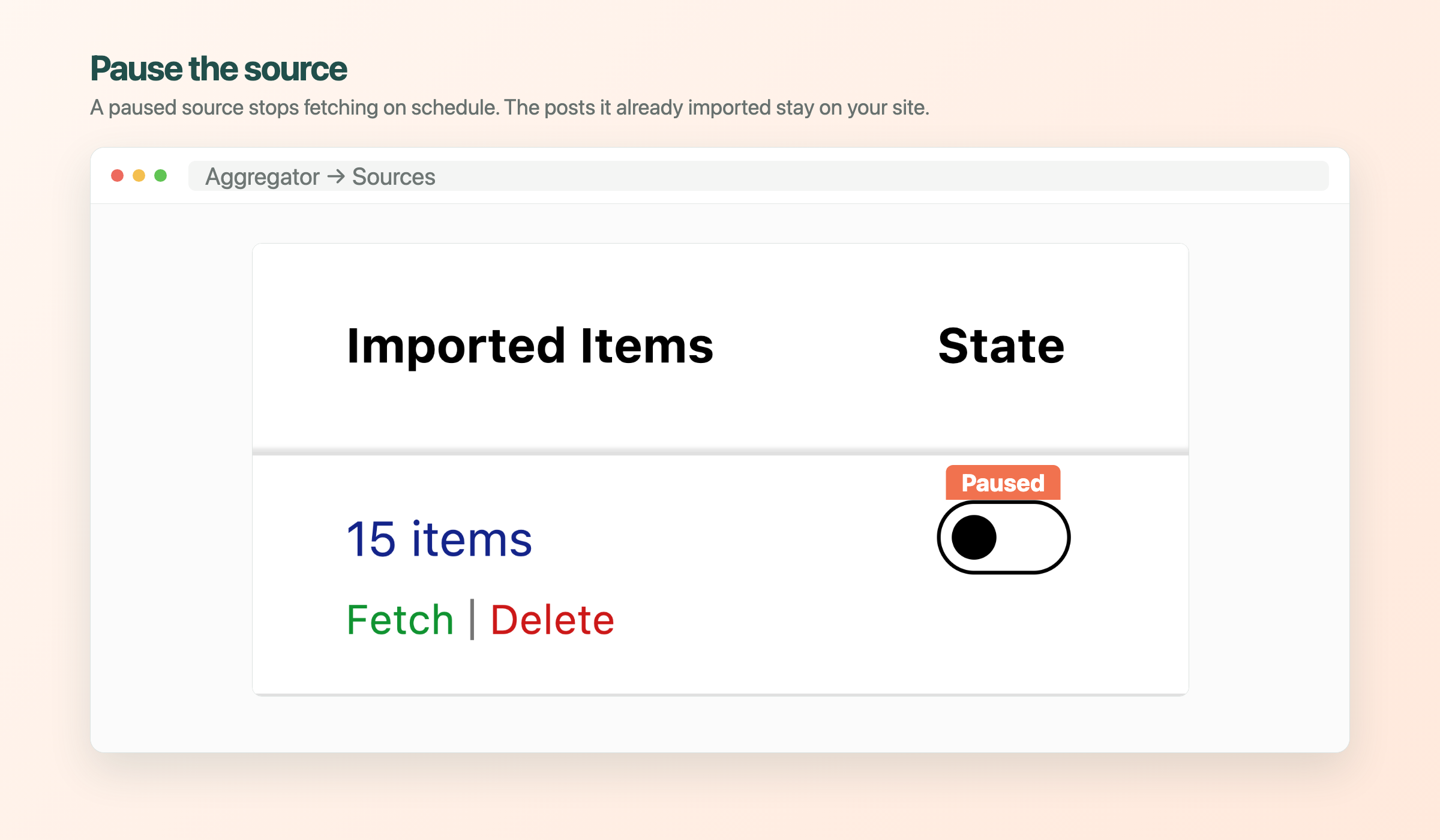
Keep it as an archive. Leave the source running until November 13 so it can import whatever Reddit still serves, then pause it with its toggle. The imported posts stay in the sidebar. Retitle the sidebar so visitors don’t expect new posts, and check the age limit under Advanced → General so it won’t delete the archive later.
Swap in a new feed. Add the replacement, such as a photography blog’s RSS feed, as its own source and check what it imports for a few days. When it fits, edit the display to select the new source and deselect r/photography, then rename the sidebar to match.
Drop the section. Remove the display’s block or shortcode from the page, then pause the source.
With its toggle switched off, the source is paused. Its Imported Items count stays the same.
After any of these, open the page and check it as a visitor would.
Don’t use Delete under Imported Items. It permanently deletes everything the source imported, and after November 13 there’s no feed to import those posts from again.
Questions about the Reddit RSS shutdown
Have Reddit RSS feeds already been discontinued?
Not yet. The shutdown is scheduled for November 13, 2026. If a Reddit feed stops working before then, check the usual causes first, such as rate limiting (a 429 error) or a refused request (a 403). Our Reddit RSS feed guide covers the URL formats and how to troubleshoot them.
Is the Reddit API shutting down too?
Not on the same day. Reddit is moving apps off its public API and onto its Developer Platform on a separate schedule, and the remaining public API access ends in March 2027.
Can a different feed URL get around the shutdown?
No. Reddit is retiring its RSS feeds as a whole and hasn’t announced an exception for any URL format, so changing the address won’t keep a feed alive after November 13.
Sort your Reddit feeds before the cutoff
For each Reddit feed, decide whether you followed it for the people or for the links. Follow communities on Reddit. Replace link and news feeds with feeds from somewhere else, and run each replacement next to its Reddit feed before November 13 so you can compare them.
For a Reddit display on your site, choose archive, swap or remove, and check the age limit before you leave an archive in place.
In the example setup, that puts r/homelab on Reddit, r/programming on Hacker News and r/spacex in a SpaceX news search, with the photo blog’s sidebar either archived or switched to a new source.
For Aggregator users
Review the feeds your site depends on
Find each Reddit source, see which displays use it, and pause it without deleting what it imported.